
TL;DR
Overview
A while back, on a security engagement, I encountered web and mobile applications that implemented client-side encryption and decryption for API requests and responses. You’ll come across this more in applications handling sensitive information.
In a nutshell, request payloads are encrypted on the client side (website and mobile apk) with some static or dynamically generated key. The encrypted payload, along with the encryption key are then sent to the backend endpoint where the payload is decrypted and processed. The backend returns an encrypted response body (if any). Often times, the backend would use the encryption key passed along in the originating request to encrypt the response (symmetric encryption). However, you’ll occasionally find implementations that encrypt the response using a different key. Regardless, the encryption key is usually passed along with the encrypted payload/response, most commonly as a custom header.
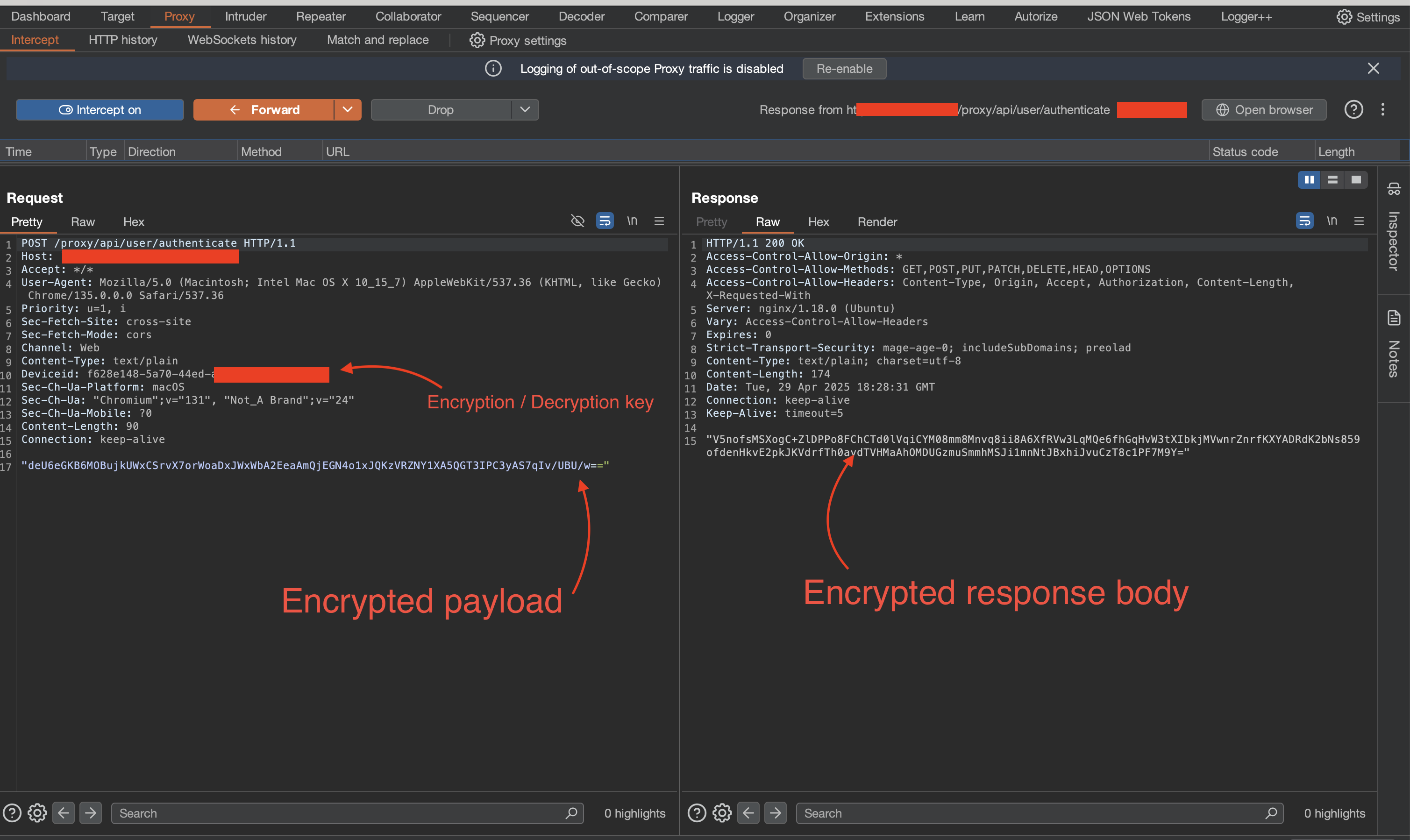
Assessing such APIs requires an understanding of how the requests and responses are carried out. Because the encryption is done client-side, it becomes a matter of taking apart the client application to identify the encryption logic. With mobile APKs and other compiled builds, this may be significantly harder to do. With web-based clients however, it can be as simple as exploring the JavaScript files with CTRL + F (find).
Road Block & Solution
Naturally, I sought out a way to poke around the API without having to manually decrypt, modify and then re-encrypt requests and responses sent to and from the server. I did a bit of research and came across PyCrypt, a really cool Burp extension written by Ano_F. You define your encryption and decryption logic as functions in a file and configure PyCrypt to call those functions to decrypt requests and responses on the fly in Burpsuite! It seemed to fit my use case.
Unfortunately, as at the time of my engagement, I experienced some bugs and couldn’t get it up and running. Moreover, I couldn’t immediately figure out how to access other parts of the HTTP requests and responses, which was crucial for what I needed to do. It’s a great tool but after a few attempts at fixing the issue, I decided to go for a quicker solution that revolved around man in the middle proxy (mitmproxy).
You see, mitmproxy allows you to extend its functionality through Addons. Addons are nothing more than python scripts that hook into mitmproxy to alter its behavior. With addons, I had more control and flexibility to decrypt/encrypt the HTTP requests and responses on the fly. I went with this option for two reasons:
- Mitmproxy addon scripts are written in Python. Python is easy. We all love Python :^)
- Time! I could estimate how long it would take me to get the solution up and running (~ 2 hours). I didn’t have to spend unknown hours trying to debug and fix issues relating to setting up PyCrypt.
How It Works
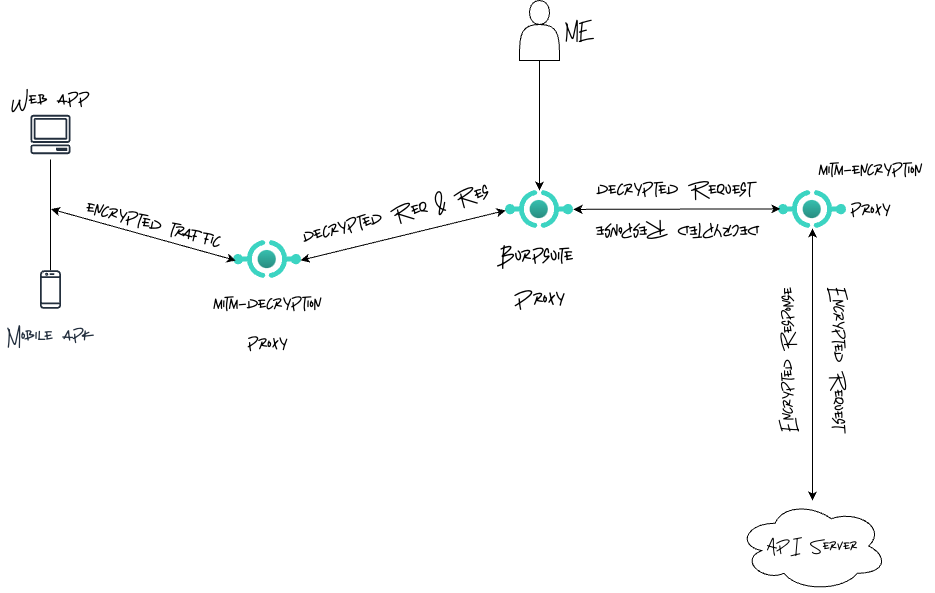
On a high level, the solution required three proxy servers: two mitmproxy servers working together with Burpsuite’s proxy server. The first mitmproxy server (mitm-decryption-proxy) would take encrypted API requests coming from the client application, decrypt and pass them along to Burpsuite. At Burpsuite, I could then interact with the decrypted requests. Modify them, repeat them, whatever. Requests going out from Burpsuite are then upstreamed to the second mitmproxy server (mitm-encryption-proxy), where they are re-encrypted before they are sent to the API server.
Subsequently, responses from the API server are decrypted by mitm-encryption-proxy, downstreamed to Burpsuite, where I can observe and modify them before they are further downstreamed to mitm-decryption-proxy where they are encrypted and passed along to the client.
Getting to work
Finding the encryption / decryption logic
Implementing addon scripts for mitm-encryption-proxy and mitm-decryption-proxy required the client-side encryption/decryption logic. To get this, I pulled up the debugger and opened up the index.js file of the webpage (right click -> inspect element -> sources tab -> index.js). In applications with multiple large JS files, you probaly should consider using breakpoints to figure out which JavaScript file holds the encryption/decryption logic. Thankfully, in this case, there was a single minified js file. The first step was to search the file (ctrl + f) for the string user/authenticate. Why? Because when I tried to login, the request fired was towards the /proxy/api/user/authenticate endpoint. This led me to the following lines of JavaScript code:
const completePasswordReset = async st => handleRequest$1("user/complete-password-reset", st)
  , resendOtpPasswordReset = async st => handleRequest$1("user/resend-otp-password-reset", st)
  , completePasswordChange = async st => handleRequest$1("user/complete-password-change", st)
  , authenticateUser = async st => handleRequest$1("user/authenticate", st)
  , openAccountStep1 = async st => handleRequest$1("account-opening/open-account-step-1", st)
  , openAccountStep2 = async st => handleRequest$1("account-opening/open-account-step-2", st)
  , acceptAccountOpeningTnc = async st => {
    const at = {
        referenceId: st
    }
      , lt = `account-opening/accept-account-opening-tnc/${st}`;
    return handleRequest$1(lt, at)
}
We can immediately infer that API calls are made using the handleRequest$1 function. So, I search the index.js file for the first occurrence of the handleRequest$1 string. This leads to the below block of code:
async function handleRequest$1(st, at, lt, ct="post") {
    var ut, dt, ft;
    try {
        const pt = at ? await aesUtilAlgorithm.encrypt(passphrase, JSON.stringify(at)) : null
          , xt = ct === "post" ? await axiosInstance.post(st, pt) : await axiosInstance.get(st)
          , mt = aesUtilAlgorithm.decrypt(passphrase, xt.data);
        return JSON.parse(mt)
    } catch (pt) {
        throw isAxiosError$3(pt) ? {
            success: !1,
            message: (ft = (dt = (ut = pt.response) == null ? void 0 : ut.data) == null ? void 0 : dt.messages) == null ? void 0 : ft[0]
        } : {
            success: !1,
            message: "Unknown error occurred"
        }
    }
}
We see the handleRequest$1 function encrypts POST request payloads using the encrypt method of the aesUtilAlgorithm class. So, finding the first occurrence of the aesUtilAlgorithm class “should” lead us to the implemented encryption and decryption logic. Once again, I search the index.js file for the string aesUtilAlgorithm and find the final piece of code:
class AesUtilAlgorithm {
    constructor(at, lt, ct, ut) {
        Cr(this, "iterationCount");
        Cr(this, "salt");
        Cr(this, "iv");
        this.keySize = at / 32,
        this.iterationCount = lt,
        this.salt = ct,
        this.iv = ut
    }
    encrypt(at, lt) {
        const ct = this.generateKey(at);
        return cryptoJsExports.AES.encrypt(lt, ct, {
            iv: cryptoJsExports.enc.Hex.parse(this.iv),
            mode: cryptoJsExports.mode.CBC,
            padding: cryptoJsExports.pad.Pkcs7
        }).toString()
    }
    decrypt(at, lt) {
        const ct = this.generateKey(at);
        return cryptoJsExports.AES.decrypt(lt, ct, {
            iv: cryptoJsExports.enc.Hex.parse(this.iv),
            mode: cryptoJsExports.mode.CBC,
            padding: cryptoJsExports.pad.Pkcs7
        }).toString(cryptoJsExports.enc.Utf8)
    }
    generateKey(at) {
        return cryptoJsExports.PBKDF2(at, cryptoJsExports.enc.Hex.parse(this.salt), {
            keySize: this.keySize,
            iterations: this.iterationCount,
            hasher: cryptoJsExports.algo.SHA1
        })
    }
}
const passphrase = v4()
  , aesUtilAlgorithm = new AesUtilAlgorithm(256,10,"432101","12341234123412341234123412341234")
  , plaintext = "Hello, world!"
  , encrypted = aesUtilAlgorithm.encrypt(passphrase, plaintext);
aesUtilAlgorithm.decrypt(passphrase, encrypted);
const PASSPHRASE_KEY = "encryption_passphrase";
let storePassphrase = localStorage.getItem(PASSPHRASE_KEY);
storePassphrase || (storePassphrase = v4(),
localStorage.setItem(PASSPHRASE_KEY, storePassphrase));
The code reveals the AesUtilAlgorithm class uses the cryptojs module to implement standard AES encryption based off a password-based derived key (PBKDF). Also, just below the class definition, aesUtilAlgorithm = new AesUtilAlgorithm(256,10,"432101","12341234123412341234123412341234") shows us the creation of the aesUtilAlgorithm instance used in the handleRequest$1 function.
Finally, the storePassphrase || storePassphrase = v4(), localStorage.setItem(PASSPHRASE_KEY, storePassphrase)); line hints that the encryption key passed to the .encrypt method is a version 4 UUID. In reality though, now that the encryption logic has been found, an arbitrary key can be used to encrypt/decrypt the requests and responses. As long as that arbitrary key is passed as the value of the DeviceID header, the API could care less.
Writing mitmproxy addon scripts
Okay, with the encryption logic in hand, the next step was to write the addon scripts for mitm-encryption-proxy and mitm-decryption-proxy. But first, I decided to convert the aesUtilAlgorithm class to its Python equivalent. I did this so I could easily integrate the encryption/decryption with mitmproxy!
# clientSideEncryption.py


import argparse
import base64
from Crypto.Cipher import AES
from Crypto.Protocol.KDF import PBKDF2
from Crypto.Util.Padding import pad, unpad
from Crypto.Hash import SHA1

class AesUtilAlgorithm:
    def __init__(self, key_size_bits, iteration_count, salt_hex, iv_hex):
        self.key_size = key_size_bits // 8  # Convert bits to bytes
        self.iteration_count = iteration_count
        self.salt = bytes.fromhex(salt_hex)
        self.iv = bytes.fromhex(iv_hex)

    def encrypt(self, password, plaintext):
        key = self.generate_key(password)
        cipher = AES.new(key, AES.MODE_CBC, self.iv)
        ciphertext = cipher.encrypt(pad(plaintext.encode('utf-8'), AES.block_size))
        return base64.b64encode(ciphertext).decode('utf-8')

    def decrypt(self, password, ciphertext):
        key = self.generate_key(password)
        cipher = AES.new(key, AES.MODE_CBC, self.iv)

        #Unpad here so it's compatible with the cipher generated with the JS lib on the Front end.
        decrypted = unpad(cipher.decrypt(base64.b64decode(ciphertext)), AES.block_size)

        return decrypted.decode('utf-8')

    def generate_key(self, password):
        return PBKDF2(password, self.salt, dkLen=self.key_size, count=self.iteration_count, hmac_hash_module=SHA1)

#__SNIP__
Great! With that out of the way, I pulled up the docs, took a look at some of the example addon scripts and eventually came up with the two scripts: mitmproxy_decrypt.py and mitmproxy_encrypt.py
# mitmproxy_decrypt.py


from clientSideEncryption import AesUtilAlgorithm
from mitmproxy import http
from json import loads, dumps

class ProxyModifier:
    """
    This class decrypts the payload of incoming requests from a client (web / mobile) and forwards
    the decrypted traffic to Burpsuite where I can poke around.

    Every decrypted response this class receives back from Burp is encrypted once more before it's
    forwarded to the client.
    """
    def __init__(self):
        self.password = None
        self.crypto = AesUtilAlgorithm(256, 10, '432101', '12341234123412341234123412341234')

    def setHeader(self, flow: http.HTTPFlow):
        return self.password = flow.request.headers.get("Deviceid", "")      #This should generally never be ""

    def request(self, flow: http.HTTPFlow) -> None:
        #This gets called when a client sends a request. We decrypt the traffic before it's upstreamed to Burpsuite
        self.setHeader(flow)
        encrypted = ''

        if flow.request.method == "POST":
            encrypted = flow.request.content.decode("utf-8")
            if not encrypted:   #Probably a POST request without a payload, return so it doesn't break
                return

            payload = self.crypto.decrypt(self.password, encrypted)
            jsonPayload = loads(payload)
            flow.request.headers["Content-Type"] = "application/json"
            flow.request.content = dumps(jsonPayload).encode('utf-8')


    def response(self, flow: http.HTTPFlow) -> None:
        if self.password and flow.response.content:
            contentType = flow.response.headers.get("Content-Type", "")

            #This check ensures we only encrypt successfully decrypted responses received from burp :)
            #Remember, Burp Suite is the upstream proxy.
            if "application/json" not in contentType or 400 <= flow.response.status_code < 500:
                return

            try:
                plaintext = flow.response.content.decode("utf-8")
                cipher = self.crypto.encrypt(self.password, plaintext)
                flow.response.content = f"{cipher}".encode('utf-8')
            except Exception as e:
                print(f'MITM DECRYPT ERROR => {e}') #I should probably write something better.


addons = [ProxyModifier()]
The mitmproxy_decrypt.py addon defines a ProxyModifier class with two key methods: request and response. These methods are called when MiTM proxy processes each request and response. In the request method, an instance of the AesUtilAlgorithm algorithm is used to decrypt the payload. Once decrypted, it’s converted to a JSON type. The response method attempts to encrypt responses only if they’re successful. Apparently, the API didn’t bother encrypting errors stemming from user/server issues.
The mitmproxy_encrypt.py addon script implements similar logic, but in a reverse order. The request method encrypts payloads from Burpsuite and the response method decrypts responses from the API server. Yes, I know. There’s no need for two separate addon scripts. It isn’t very DRY. At the time, I was focused on getting it to work ¯\_(ツ)_/¯
# mitmproxy_encrypt.py


class ProxyModifier:
    def __init__(self):
        self.password = None
        self.crypto = AesUtilAlgorithm(256, 10, '432101', '12341234123412341234123412341234')


    def setHeader(self, flow: http.HTTPFlow):
        return self.password = flow.request.headers.get("Deviceid", "")        #This should generally never be ""

    def request(self, flow: http.HTTPFlow) -> None:
        #This gets called when burp sends a request. We encrypt the traffic and send it off to the API.

        self.setHeader(flow)
        if flow.request.method == "POST":
            plaintext = flow.request.content.decode("utf-8")
            cipher = self.crypto.encrypt(self.password, plaintext)
            flow.request.content = cipher.encode('utf-8')

    def response(self, flow: http.HTTPFlow) -> None:
        if self.password and flow.response.content:
            #The api only encrypts the response if the request is successful (returns a 200 OK)
            if 400 <= flow.response.status_code < 500:
                return  #no point encrypting, just leave the response unmodified :)
            try:
                encrypted = flow.response.content.decode("utf-8")
                payload = self.crypto.decrypt(self.password, encrypted)
                jsonPayload = loads(payload)
                flow.response.content = dumps(jsonPayload).encode('utf-8')
                flow.request.headers["Content-Type"] = "application/json"

            except Exception as e:
                print(f'\n\nERROR DECRYPTING PAYLOAD FROM API => {e}\n')    #should probably improve this


addons = [ProxyModifier()]
Putting it together (Mitmproxy > Burpsuite > Mitmproxy)
With all the pieces accounted for, it was time to put everything together, starting with the mitmproxy servers.
I began by creating themitm-decryption-proxy server using the below command:
#mitm-decryption-proxy
$ mitmdump --listen-port 8081 -s mitmproxy_decrypt.py --mode upstream:http://127.0.0.1:8082 -k
[10:20:08.674] Loading script mitmproxy_decrypt.py
[10:20:08.739] HTTP(S) proxy (upstream mode) listening at *:8081.
This command creates a mitmproxy server listening on port 8081. The -s flag tells the server to load and use the mitmproxy_decrypt.py script. The --mode flag sets the proxy to upstream mode where it proxies all traffic to the server listening at http://127.0.0.1:8082 (Burpsuite). Finally, the -k flag instructs mitmproxy to not verify the SSL/TLS certificate for the upstream server.
I then proceeded to create the mitm-encryption-proxy server using a similar command. The server was set to listen on port 8083
#mitm-encryption-proxy
$ mitmdump --listen-port 8083 -s mitmproxy_encrypt.py -k
[10:25:05.258] Loading script mitmproxy_encrypt.py
[10:25:05.305] HTTP(S) proxy listening at *:8083.
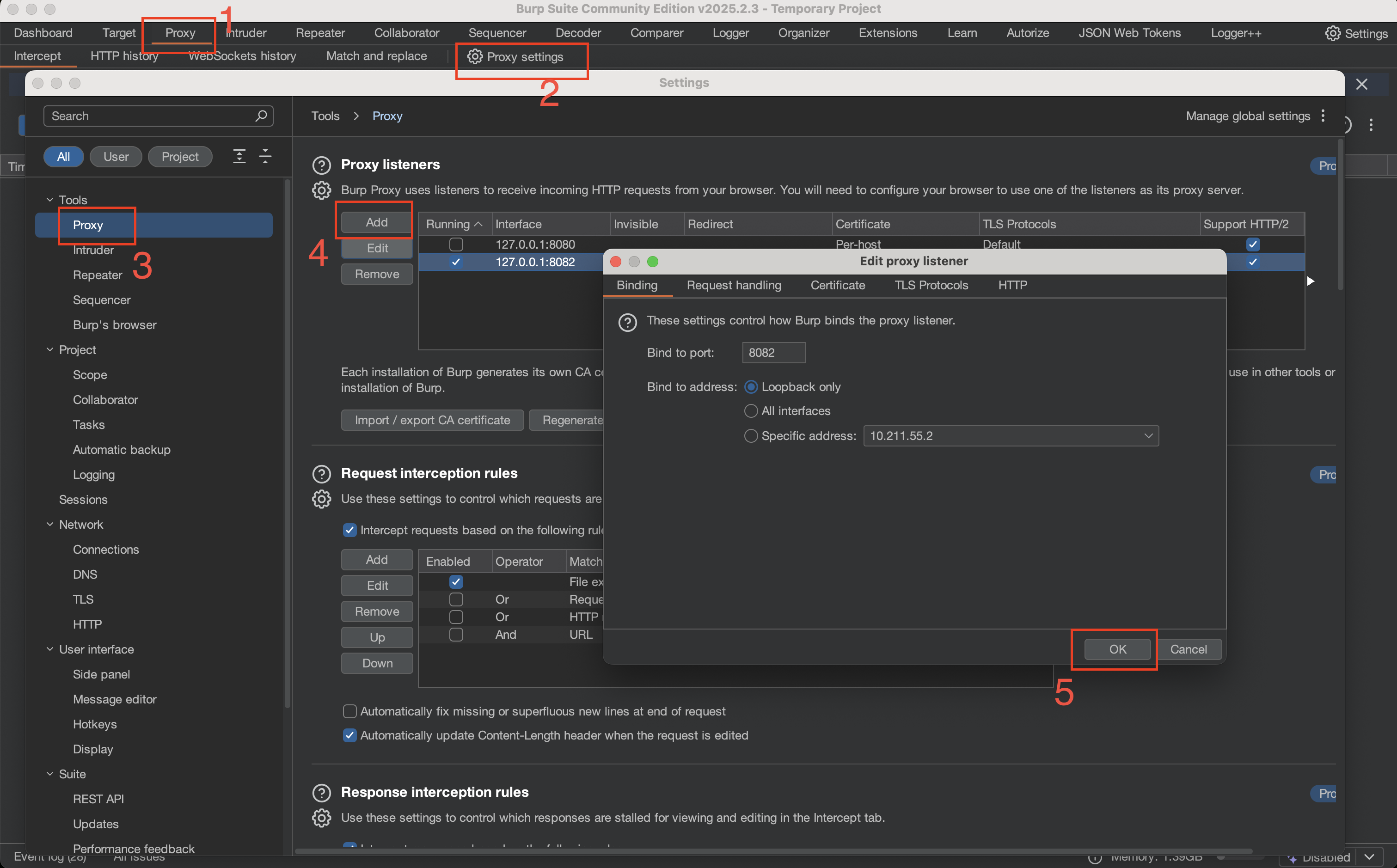
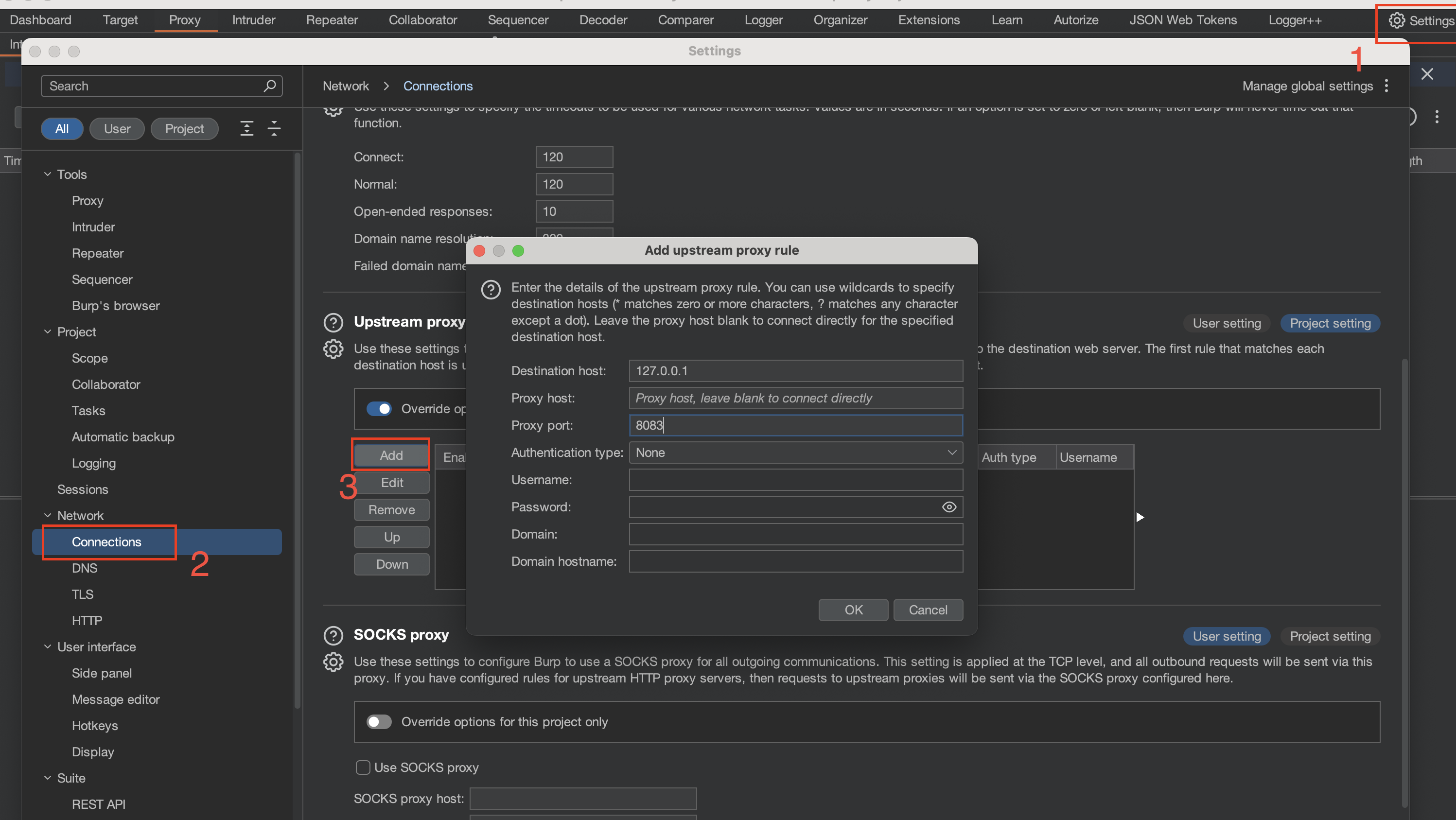
Finally, I configured Burpsuite to do two things: listen on port 8082 (where the mitm-decryption-proxy forwards requests to) and upstream traffic to the mitm-encryption-proxy on port 8083.
We can add a new proxy listener in Burp by clicking the Proxy tab -> Proxy Settings -> Tools -> Proxy -> Add
Once that’s done, we can then set the upstream server from the settings
The final step would be to configure your web browser to proxy to port 8081.
Did it Work?
Well, we wouldn’t be here if it didn’t :)
Remember that login request from the overview section? I tried to login again and this time, I could see the decrypted request payload and server response!
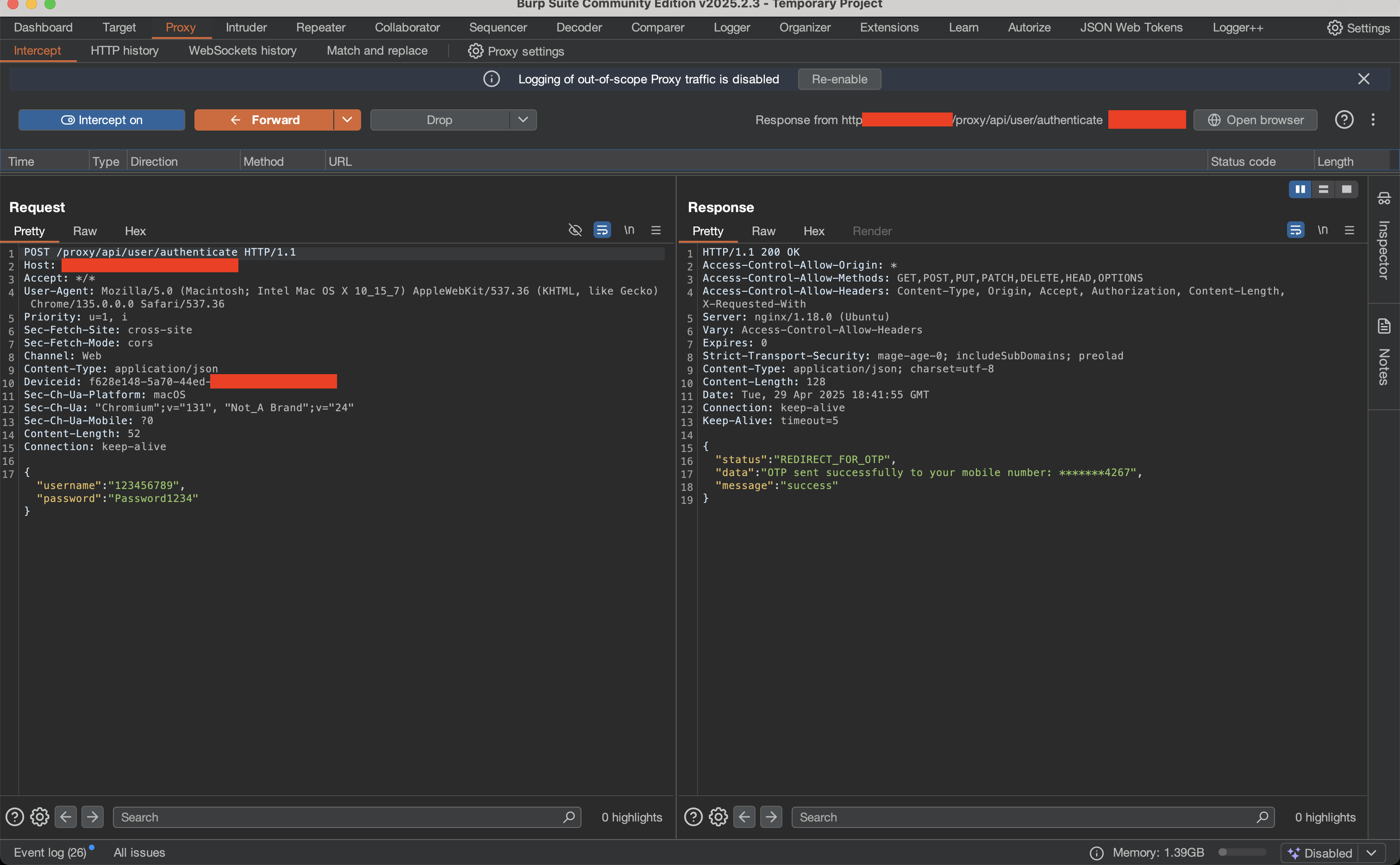
Mission accomplished!

Strengths & Weaknesses
The biggest strength of this approach is the flexibility it allowed. While reviewing the mobile client, I discovered that it implemented a slightly different encryption algorithm. Although the mobile client consumed the exact API endpoints, the server behaved differently when responding to the mobile client. I wasted no time in extending the functionality of the addon scripts to account for API behavioral changes based on the client issuing the request. This gave me a consistent experience while I tested between the Web and Mobile clients.
Consequently, the biggest weakness with this approach was its ability to process high volumes of requests. Bruteforce attempts with tools such as FFuf and Burpsuite’s Turbo intruder gave lots of false positives and negatives. mitm-encryption-proxy couldn’t keep up with the volume of traffic and just errored out in most cases. Attacks that relied on high speed were not feasible.
PyCrypt’s features list indicates that it supports Intruder Bruteforce attacks, making it a better alternative for tests that required speed. However, I believe the approach chosen ultimately depends on your requirements.
Conclusion
Being able to view decrypted requests and responses allowed me to focus on testing the API without simultaneously dealing with nuances that come with manually decrypting/encrypting traffic as I progressed. I am of the opinion that client-side encryption where the encryption key is easily accessible is a bit pointless. It feels more like “security through obscurity” and provides no real security to API endpoints.
The security of a cryptosystem must lie in the choice of its keys only; everything else (including the algorithm itself) should be considered public knowledge - Kerckhoffs’ Principle
I think at the end of the day, companies majorly go with this option to remain compliant with regulatory requirements.